
 

Flatpak Automatic is a secure, systemd-native automation wrapper for Flatpak updates. It features Snapper-integrated atomic rollbacks, multi-channel alerting (Apprise, Mail, Webhooks, Desktop), and supports both system-wide and rootless user-level execution. Designed for reliability and ease of use, it ensures your Flatpak environment remains current and resilient.
✨ Features
- Automated Flatpak Updates: Keep your flatpak applications up-to-date seamlessly in the background.
- Exclusion List: Prevent specific Flatpaks from updating automatically.
- Atomic-like Rollbacks: Integrates with Snapper/Btrfs for pre/post snapshots.
- Flexible Notifications: Multiple delivery methods and formats supported, adapting to varying infrastructure needs (Apprise, Webhooks, Mail, Desktop).
- Systemd Integration: Managed via standard oneshot services and timers
- Smart Execution: Dry-run checks prevent unnecessary snapshots and logs
- Dual-Default Configuration: Separate system and user-level default profiles with XDG-compliant overrides and auto-scaffolding.
- Non-Root Execution: Secure, user-level systemd integration.
- Desktop Integration: Native XDG
.desktopentry included for seamless launching from GUI application menus (GNOME, KDE, etc.) with automated terminal routing.
🚀 Quick Start Guide
Flatpak Automatic is distributed via a dedicated repository hosted on GitHub Pages for both RPM (Fedora/RHEL) and DEB (Ubuntu/Debian) distributions:
👉 https://fedorabee.github.io/flatpak-automatic/repository/
1. Add the Repository
Fedora/RHEL:
sudo tee /etc/yum.repos.d/flatpak-automatic.repo <<'EOF'
[flatpak-automatic]
name=Flatpak Automatic - Stable
baseurl=https://fedorabee.github.io/flatpak-automatic/rpms/latest/stable/
enabled=1
gpgcheck=1
gpgkey=https://fedorabee.github.io/flatpak-automatic/gpg.key
EOF
Ubuntu/Debian:
KEY="https://fedorabee.github.io/flatpak-automatic/gpg.key"
REPO="https://fedorabee.github.io/flatpak-automatic/debs"
RING="/usr/share/keyrings/flatpak-automatic-archive-keyring.gpg"

curl -fsSL $KEY | sudo gpg --dearmor -o $RING
sudo chmod 644 $RING
echo "deb [signed-by=$RING] $REPO stable main" | \
sudo tee /etc/apt/sources.list.d/flatpak-automatic.list
2. Update Cache & Install
Fedora/RHEL:
sudo dnf makecache && sudo dnf install -y flatpak-automatic
Ubuntu/Debian:
sudo apt update && sudo apt install -y flatpak-automatic
Local Development (pip):
For local development or testing without RPM/DEB packaging, you can install the package in editable mode:
pip install -e ".[test,apprise]"
3. Enable the Timer
To enable and start the automatic update timer:
sudo flatpak-automatic --enable-timer
To disable and stop the timer:
sudo flatpak-automatic --disable-timer
To run flatpak-automatic securely without root privileges, utilize the same commands without sudo:
flatpak-automatic --enable-timer
This ensures updates are handled within the user session, adhering to strict least-privilege security models.
⚙️ Configuration
The main configuration file is located at:
/etc/flatpak-automatic/config.yaml
Key options include:
auto_update: (bool) Automatically install available updates.exclusions: (list) List of Flatpak App IDs to exclude from automatic updates.auto_notify: (string) Notification policy:always,on-change,on-failure, ornever.timer.schedule: (string) The systemd timer execution schedule (e.g.,daily,weekly).timer.delay: (string) Maximum randomized delay for the timer.timer.minimum_delay: (string) Minimum randomized delay for the timer.snapshots.enabled: (bool) Globally enable or disable Snapper snapshot creation.snapshots.snapper_config: (string) The Snapper configuration to use (default:root).notification_policy: (object) Toggle global notification methods:desktop,mails,webhooks,apprise.notification_groups: (list) Defines multiple notification groups with fine-grained settings (title, body_template, recipient, URLs, etc.).
For non-root users, local configuration overrides can be placed at:
~/.config/flatpak-automatic/config.yaml
(This file is automatically generated from the user default template on the first run).
💾 Manual Execution & CLI
To trigger an update manually or use the advanced CLI:
usage: flatpak-automatic [-h] [-d] [-t] [-f] [-s] [-B] [-v] [-V] [-l] [-a] [-c]
                         [-r] [--desktop-mode] [-e] [-x]

Flatpak Automatic - Advanced Update Automation

options:
  -h, --help            show this help message and exit
  -d, --dry-run         Simulate the update process without applying changes.
  -t, --test-notify     Send a test notification to configured endpoints and exit.
  -f, --force           Force the update process, ignoring safeguards.
  -s, --status          Display system monitoring overview and exit.
  -B, --hide-banner     Hide the header ASCII banner upon execution.
  -v, --version         Show application version and exit.
  -V, --verbose         Enable verbose output (e.g. detailed status view with -s/--status).
  -l, --history         Display recent update history from journalctl and exit.
  -a, --apply-schedule  Apply systemd timer overrides based on config settings.
  -c, --check-config    Validate and print the current configuration, then exit.
  -r, --reload          Send SIGHUP to a running instance to reload its config.
  --desktop-mode        Run in interactive desktop mode (keeps terminal open
                        after completion).
  -e, --enable-timer    Enable and start the systemd timer (auto-scope).
  -x, --disable-timer   Disable and stop the systemd timer (auto-scope).
Architecture & Deployment
flatpak-automatic is designed with a dual-architecture model, supporting simultaneous parallel execution:
- System-Wide (Root): Updates global system flatpaks. Ideal for multi-user deployments.
- User-Level (Rootless): Updates user-specific flatpaks. Recommended as the primary, secure default for desktop environments.
📁 Repository Contents
The package repository contains:
- RPM packages:
flatpak-automatic(in/rpms) - Debian packages:
flatpak-automatic(in/debs) - Repository metadata
- GPG signing key (
gpg.key)
🔐 GPG Key
The GPG key is available at https://fedorabee.github.io/flatpak-automatic/gpg.key.
GPG Fingerprint: 8D12 D614 9E1E 5E83 29DD E6FD 9B99 A03F 6577 BF59
Troubleshooting & Runbook
If you encounter issues with flatpak-automatic, follow these steps to diagnose and resolve them:
1. Validate Configuration
If the script behaves unexpectedly after configuration changes, validate your YAML syntax and active settings:
flatpak-automatic --check-config
2. Check Execution History & Logs
Since the script integrates natively with systemd, check the system journal for detailed logs of previous runs:
flatpak-automatic --history
For user-level execution, you can also check the user-specific journal:
journalctl --user -u flatpak-automatic.service
3. Verify Notification Endpoints
If you are not receiving alerts, use the test notification command to verify your configuration and connectivity:
flatpak-automatic --test-notify
Common Email Issues: If mail notifications fail, ensure s-nail or mailx is configured correctly in /etc/mail.rc. Test it manually: echo "test" | s-nail -s "Test Subject" admin@example.com
4. Snapper Config Errors
If the health check reports FAIL: snapper config 'root' is invalid or missing, you need to initialize a Snapper configuration for your root filesystem:
sudo snapper -c root create-config /
Note: Snapper snapshots require Btrfs and are generally only supported for root-level execution.
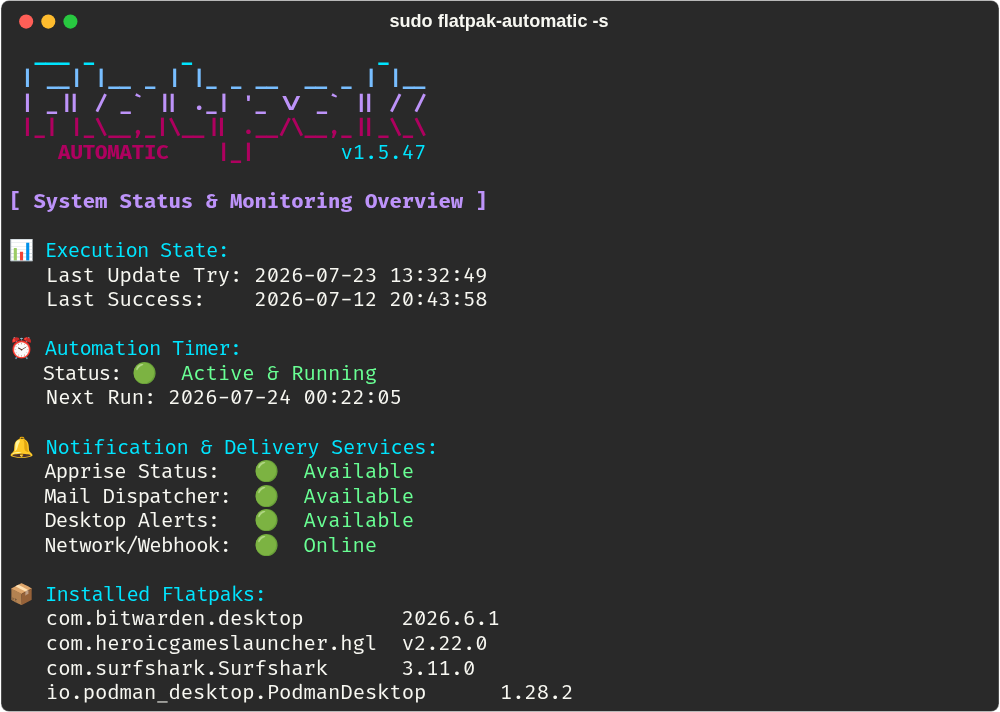
5. System Status Overview
Check the current state of the automation, including last run times and monitored packages:
flatpak-automatic --status
🔗 Resources
- 📝 GitHub Source Code
- 🌐 Repository
- 📖 Technical Manifest
- 🛠 Development Guide
- 🧪 Testing Guide
- 🤝 Contribution Guidelines
- 📜 Changelog
- 🧑💻 Maintainer's Guide
- 🔒 Security Policy
⚠️ Disclaimer
This is an independent project and not affiliated with Fedora or the Flatpak project. Use at your own discretion.